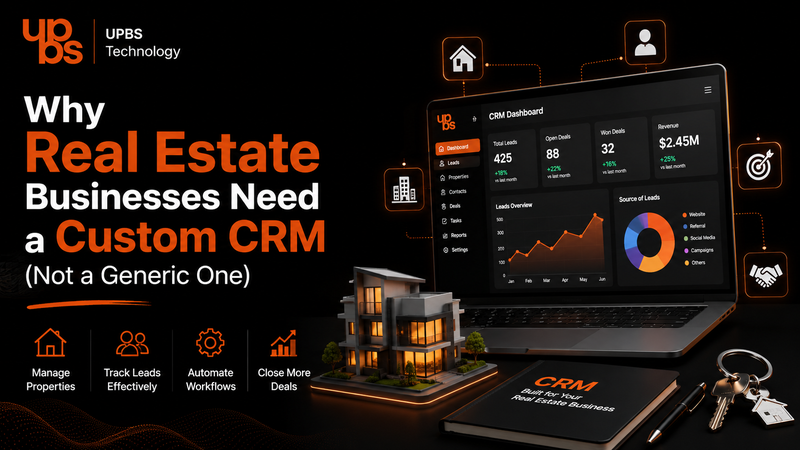
Real estate is a relationship business. Every lead, site visit, follow-up call, and closed deal depends on timing and personal attention. Yet most real estate teams still run their entire sales pipeline on generic, off-the-shelf CRM tools that were built for retail or SaaS companies, not for property sales cycles. If you've ever felt like your CRM is fighting you instead of helping you, the problem usually isn't your team, it's the software. This is exactly why more real estate businesses are moving toward custom CRM development: software that's actually built around how property deals really happen. Before making that switch, it helps to understand what custom software development really involves and why it works so differently from buying a template solution off the shelf.
What Makes Real Estate CRM Needs So Different
Real estate sales don't follow a simple, linear funnel. A single lead might involve multiple site visits, changing budgets, family decision-makers, loan approvals, and negotiations that stretch over months. Generic CRMs are designed for shorter, simpler sales cycles, so teams end up bending their workflow to fit the software instead of the other way around. A custom CRM removes that friction it's designed around your actual sales stages, your inventory structure, your broker network, and your follow-up rhythm, so your team spends less time managing the tool and more time closing deals.
Why Generic CRMs Fail Real Estate Businesses
Most out-of-the-box CRMs can create challenges as a real estate team grows, especially when the system isn’t designed around property management, lead tracking, sales processes, and the specific workflows of the business.
- No proper way to manage property inventory, unit-level status, or project-wise leads
- Follow-up reminders that don't match long, multi-touchpoint real estate sales cycles
- Poor integration with property portals, WhatsApp, and site-visit scheduling
- Generic reporting that doesn't reflect broker performance or project-wise conversion
- Rigid customer service workflows that can't handle post-sale queries, documentation, or possession updates
This last point matters more than most teams realize. Buyers don't stop needing support after signing; they need updates on construction, documentation, and possession timelines. Without a proper customer service CRM built into the system, these post-sale conversations get lost in emails and personal WhatsApp chats instead of being tracked centrally.
What a Custom CRM Development Partner Actually Brings
Choosing custom CRM development over a generic subscription means the software is built around your business logic from day one: your property types, your sales hierarchy, your commission structures, and your reporting needs. Instead of paying for fifty features you'll never use, you get exactly what your sales and support teams need to move faster. If you're evaluating this path, it's worth seeing how a dedicated custom CRM services approach is structured for growing businesses before committing to a platform.
Key Features Real Estate Businesses Need in a Custom CRM
A well-built custom CRM for real estate should typically include the essential features needed to manage leads, properties, clients, sales activities, and team workflows efficiently.
- Project and inventory management — unit-wise availability, pricing, and status in real time
- Lead scoring by intent — separating serious buyers from early-stage browsers
- Automated, cycle-aware follow-ups — reminders that match how long real estate deals actually take
- Broker and channel partner tracking — commissions, performance, and lead source visibility
- Integrated customer service CRM tools — so post-sale queries, documentation, and possession updates are tracked in one place instead of scattered across calls and chats
- Custom dashboards and reporting — project-wise, broker-wise, and stage-wise visibility for management
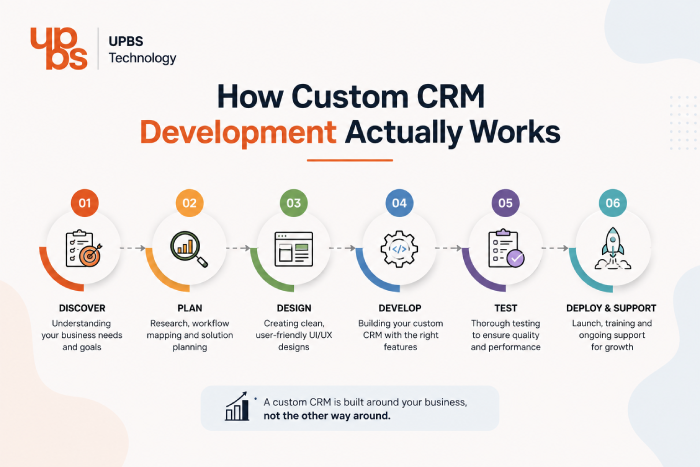
How Custom CRM Development Actually Works
A common misconception is that custom CRM development takes months longer than buying an off-the-shelf tool. In practice, the process is more structured than people expect:
- Discovery — mapping your current sales stages, broker structure, and pain points.
- Architecture planning — deciding what data lives where, and how the CRM connects to your website, WhatsApp, and property portals.
- Design and build — building the modules your team actually uses: inventory, lead tracking, follow-ups, and customer service.
- Migration — moving existing leads and historical data from spreadsheets or your old CRM without losing anything.
- Team training and rollout — getting your sales and support staff comfortable before going fully live.
- Ongoing support — refining workflows as your project portfolio and team size grow.
Because the system is built around your existing process rather than forcing you into a template, adoption is usually faster than teams expect most sales staff to be comfortable within the first couple of weeks.
Custom CRM vs. Generic CRM - Where the Difference Actually Shows
The difference isn't just in features on paper it shows up in daily usage. Generic CRMs force your team to create workarounds: spreadsheets on the side, manual reminders, and duplicate data entry across tools. A custom CRM is shaped around your existing process, so adoption is faster and data stays accurate because your team isn't fighting the interface every day. For a deeper technical breakdown of what goes into building one, our guide on the custom CRM development solution walks through the process end to end.
A Real-World Scenario: Before and After a Custom CRM
Consider a mid-sized real estate firm managing three ongoing projects. On a generic CRM, a sales executive tracks unit availability in a shared spreadsheet, follow-ups happen through personal reminders, and post-sale questions from buyers come in through WhatsApp messages that never get logged anywhere. When a manager asks which units are still available in Tower B, someone has to manually check and reply.
With a custom CRM, the same firm has live, unit-level inventory visible to every executive, follow-ups triggered automatically based on how long a lead has gone quiet, and every post-sale query documentation requests, possession updates, loan queries logged against the buyer's profile. The manager sees availability instantly on a dashboard instead of asking someone to check. That shift, multiplied across dozens of leads a month, is usually where the real ROI of custom CRM development shows up.
Why Your Sales Team Needs the CRM On the Go
Real estate sales rarely happen at a desk. Site visits, walk-ins, and on-the-spot negotiations mean your team needs CRM access from their phones, not just a browser tab back at the office. A custom CRM built with mobile-first access lets executives update lead status, log site-visit feedback, and check unit availability while standing in front of the buyer instead of updating the system hours later from memory, by which point details get lost or forgotten.
Data Security and Ownership Matter More in Real Estate
Real estate deals involve sensitive financial information, loan details, ID documents, payment schedules, and personal buyer data. Generic CRMs often store this data on shared, multi-tenant infrastructure with limited control over access permissions. A custom CRM gives you control over exactly who can see what: a site executive doesn't need visibility into financial documents a back-office team handles, and role-based access can be built in from day one instead of retrofitted later. You also own your data outright, rather than being dependent on a third-party vendor's export policies if you ever want to switch systems.
How Much Does Custom CRM Development Cost?
This is usually the first question real estate business owners ask, and the honest answer is: it depends on scope. A basic custom CRM covering lead management, inventory tracking, and follow-up automation costs less than a full system with broker portals, customer service modules, and integrations with property listing sites and payment gateways. The more useful way to think about it isn't the sticker price against a generic CRM's monthly subscription, but the cost of lost leads, duplicate data entry, and missed follow-ups that generic tools quietly cause every month. Most businesses find that a custom CRM pays for itself within the first few months once lead leakage drops and follow-up consistency improves.
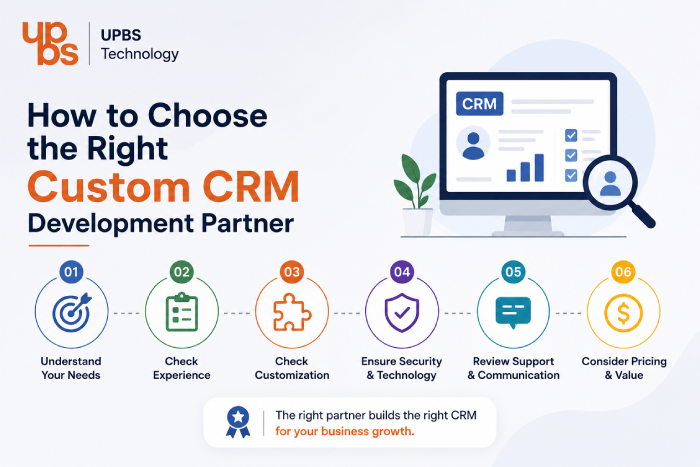
How to Choose the Right Custom CRM Development Partner
Not every development team understands real estate sales cycles, so it's worth checking for a few things before committing:
- Have they built CRMs for property or high-consideration sales businesses before?
- Do they design around your existing workflow, or push a fixed template?
- Can the system integrate with your website, WhatsApp, and listing portals?
- Is there a clear support and iteration plan after launch, not just a one-time handover?
- Do they build in role-based access and data ownership from the start?
Asking these questions upfront saves months of rework later.
Your Website Still Plays a Big Role in Lead Quality
A custom CRM is only as good as the leads feeding into it. Many real estate businesses lose quality leads at the very first step: a slow, outdated, or non-mobile-friendly website that doesn't capture visitor intent properly. Pairing your CRM upgrade with a strong, conversion-focused website development strategy ensures the leads entering your new system are actually worth following up on.
Visibility Matters Just as Much as the System Behind It
Even the best CRM can't help a business that buyers can't find online. Real estate is a highly local, high-intent search category, and ranking for the right property and location-based searches directly affects how many leads reach your CRM in the first place. Investing in dedicated SEO services alongside your CRM upgrade helps make sure the system you're building is actually getting used at full capacity.
Why Real Estate Businesses Choose UPBS Technology for Custom CRM Development
At UPBS Technology, custom CRM development isn't a side offering bolted onto a generic product, it's built process-first, starting with how your sales team, brokers, and support staff actually work day to day. Our team has worked with real estate and high-consideration sales businesses to design CRMs around project-wise inventory, multi-touchpoint follow-ups, and post-sale customer service, instead of forcing your business into a one-size-fits-all template. From the first discovery call to post-launch support, the goal is a system your team actually wants to use, not one they're told to use.
Signs It's Time to Upgrade Your Systems, Not Just Your CRM
Sometimes the CRM isn't the only outdated piece of the puzzle; the website and backend systems around it need attention too. If your site feels slow, leads aren't syncing properly, or your online presence hasn't been touched in years, it's worth reviewing these signs your business needs website maintenance before rolling out a new CRM on top of an aging setup.
Ready to Build a CRM That Actually Fits Your Business?
Generic software will always ask your business to adapt. A custom CRM adapts to you - your properties, your process, and your customers. If you're ready to stop managing spreadsheets and start managing deals, book a free consultation and let's design a custom CRM built around how your real estate business actually works.
Frequently Asked Questions
What is a custom CRM for real estate businesses?
A custom CRM is software built specifically around a real estate company's sales process, inventory structure, and customer service needs, instead of a generic template used across unrelated industries.
How is custom CRM development different from a generic CRM?
Custom CRM development starts with your actual workflow property types, sales stages, broker structure, and follow-up cycles so the system fits your business instead of forcing your team to adapt to it.
Can a custom CRM also handle customer service after a sale closes?
Yes. A properly built customer service CRM module tracks post-sale queries, documentation requests, and possession updates in one place, rather than losing them across calls and messages.
How long does custom CRM development take?
Timelines vary by scope, but a focused CRM covering core sales and follow-up modules typically takes a few weeks to a few months, with more complex, fully integrated systems taking longer.
Is custom CRM development worth it for a small or mid-sized real estate business?
It depends on sales volume and complexity. Once a team is juggling multiple projects, brokers, and long follow-up cycles, a custom CRM typically pays for itself in saved time and better lead conversion.