
Imagine a potential customer visits your website, fills out an inquiry form, and waits for your sales team to respond. Your team is busy handling other leads, answering calls, and updating spreadsheets. By the time someone follows up, the prospect has already contacted a competitor. This situation is more common than many businesses realize.
Manual follow-ups, delayed responses, forgotten reminders, and scattered customer information can prevent businesses from converting interested prospects into paying customers. Even if your marketing campaigns generate a steady flow of inquiries, poor follow-up processes can leave valuable opportunities untapped.
The solution is not always to hire more sales representatives. In many cases, the real problem lies in how leads are managed. Custom CRM development helps businesses build effective systems to organize leads, automate repetitive follow-up tasks, track customer interactions, and create a more consistent sales process.
Why Are Businesses Losing Leads Because of Manual Follow-Ups?
Generating leads requires time, effort, and investment. Businesses spend money on SEO, paid advertising, social media marketing, email campaigns, and website development to attract potential customers.
Delayed Responses to New Inquiries
When a potential customer submits an inquiry, they usually expect a timely response. If your sales team takes hours or days to reply, the prospect may lose interest or approach another provider.
This is especially important for businesses operating in competitive industries where customers compare multiple service providers before making a purchase.
Forgotten Follow-Up Calls and Emails
Sales representatives often manage several prospects simultaneously. Without automated reminders, a scheduled call or follow-up email can easily be forgotten.
A prospect who was interested in your services may eventually stop responding simply because your team did not reconnect at the right time.
Disorganized Lead Information
Many businesses store lead details across spreadsheets, email inboxes, WhatsApp conversations, and individual employees' notes. This makes it difficult to identify the latest interaction, understand customer requirements, or determine which sales representative is responsible for the next step.
Inconsistent Communication
One prospect may receive multiple messages from different team members, while another may receive no follow-up at all. Without a standardized process, the quality and frequency of communication depend heavily on individual employees rather than a reliable business system.
Difficulty Tracking Sales Performance
When follow-up activities are managed manually, sales managers often struggle to answer important questions:
- How many new leads did we receive this month?
- How quickly does our team respond to inquiries?
- Which prospects need immediate attention?
- How many leads have moved to the next sales stage?
- Why are potential customers not converting?
Without accurate visibility, improving sales performance becomes much harder.
The core problem: Your business may not be losing leads because customers lack interest. You may be losing them because your follow-up process is not organized, timely, or consistent.
What Is CRM Automation?
Customer Relationship Management (CRM) automation uses software and predefined workflows to automate repetitive activities involved in managing customer relationships and sales opportunities. Instead of depending entirely on employees to record every inquiry, remember every call, and send every message manually, a CRM system helps your team manage these activities through centralized data and automated rules.
For example, when someone submits a contact form on your website, an automated CRM workflow can:
- Capture the lead's name, email address, phone number, and inquiry details.
- Create a new lead record in the CRM.
- Assign the lead to the appropriate sales representative.
- Send an acknowledgment email or another permitted response.
- Create a follow-up task for the sales team.
- Trigger additional communication based on the lead's status and interactions.
CRM automation does not replace the human side of selling. It helps ensure that important sales activities happen at the right time and that your team has the information needed to make better decisions.
How CRM Automation Helps Your Business Stop Losing Leads
Implementing CRM automation works best when you identify the gaps in your existing sales process and automate the activities that cause the most friction.
Here are the essential steps to building a more effective follow-up system.
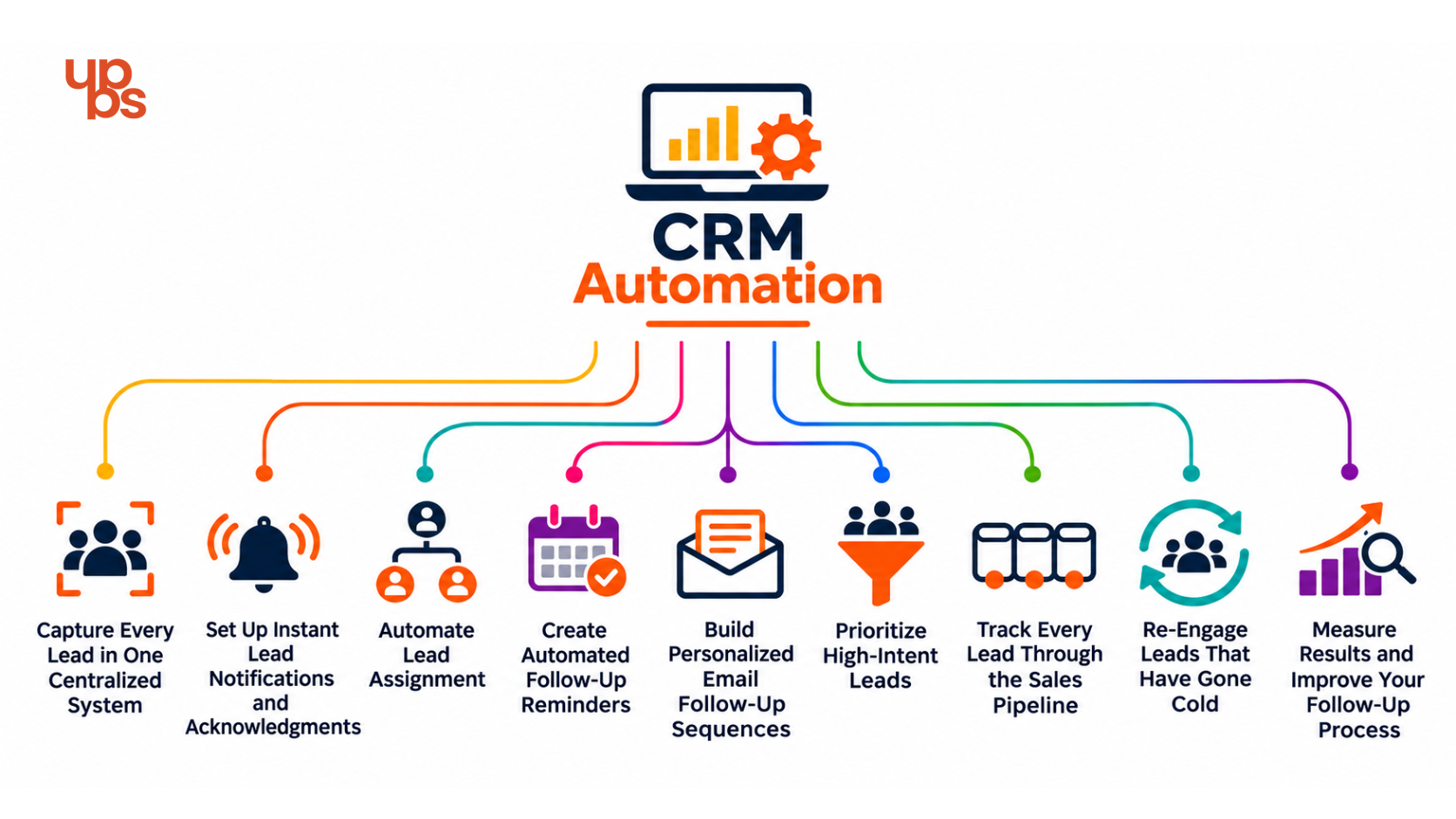
Step 1: Capture Every Lead in One Centralized System
The first step is to bring all your leads into one place.
Businesses often receive inquiries through multiple channels, including website forms, landing pages, email campaigns, social media, paid advertisements, and phone calls. Managing each channel separately increases the risk of missing important inquiries.
A CRM system can collect leads from supported channels and store their details in a centralized database. For example, if a potential customer requests a software development quotation through your website, the CRM can create a lead record containing the contact details, service requirement, inquiry date, and lead source.
How this helps: Your team gets a clearer view of incoming inquiries, reduces manual data entry, and has a reliable place to track each prospect.
Step 2: Set Up Instant Lead Notifications and Acknowledgments
Once a lead enters your CRM, the next priority is ensuring that someone takes responsibility for it.
You can configure automated notifications to alert the appropriate sales representative when a new inquiry arrives. Depending on your workflow, the system can also send an acknowledgment email confirming that the inquiry has been received.
For example, a website visitor requesting a digital marketing consultation could receive a message confirming receipt of the request, while the assigned sales representative receives notification to review it.
How this helps: New inquiries become visible to your team sooner, and prospects receive confirmation that their requests have reached your business.
Step 3: Automate Lead Assignment
Not every lead should go to the same sales representative. A business may need to distribute leads according to service requirements, geographic location, team availability, industry expertise, or sales territory.
Some businesses also use round-robin assignment to distribute leads across eligible representatives.
How this helps: Leads reach the right people, responsibility becomes clearer, and fewer opportunities get stuck waiting for someone to claim them.
Step 4: Create Automated Follow-Up Reminders
One of the most common problems with manual follow-ups is forgetting when to contact a prospect again. A CRM can automatically create tasks based on the lead's status, last interaction, or the next scheduled activity.
For example, if a representative sends a proposal but does not receive a response, the CRM can create a reminder to follow up after an appropriate interval. If the prospect requests a call next week, the system can schedule a task for that date instead of relying on an employee's memory.
How this helps: Your team follows a more consistent schedule, and fewer prospects are neglected because of missed reminders.
Step 5: Build Personalized Email Follow-Up Sequences
Repeatedly writing the same follow-up messages wastes time. However, sending generic messages to every prospect can make communication feel impersonal. CRM automation allows businesses to create email sequences tailored to the prospect's interests, inquiry type, and stage in the buying journey.
For example, a lead interested in website development might receive:
- An initial acknowledgment of the inquiry.
- A relevant overview of your website development services.
- A useful case study or project example.
- A follow-up invitation to discuss project requirements.
How this helps: Your business maintains consistent communication without requiring employees to compose every message from scratch.
Step 6: Prioritize High-Intent Leads
Not all leads have the same level of interest or buying readiness. Some prospects are actively comparing providers and requesting quotations. Others are researching solutions and may need more information before speaking to sales.
CRM automation can support lead scoring using defined criteria, such as service-page visits, form submissions, email engagement, budget fit, and interactions with your sales team. The exact criteria depend on the CRM platform and integrations available.
How this helps: Your team can prioritize promising opportunities, focus its time more effectively, and avoid treating every inquiry as equally urgent.
Step 7: Track Every Lead Through the Sales Pipeline
Without a clear sales pipeline, it becomes difficult to understand where opportunities are getting stuck.
A CRM pipeline organizes leads into stages such as:
- New inquiry
- Contact attempted
- Qualified lead
- Meeting scheduled
- Proposal sent
- Negotiation
- Won or lost
Your team can update stages as conversations progress, while automation can trigger appropriate tasks or notifications when a lead moves from one stage to another.
How this helps: Sales managers gain better visibility into pending opportunities, upcoming activities, and the stages where leads are most likely to drop off.
Step 8: Re-Engage Leads That Have Gone Cold
Not every prospect is ready to purchase immediately. Some may delay a project, postpone a decision, or stop responding because their priorities have changed. Without a follow-up system, these leads can disappear from your sales team's attention.
CRM automation can identify leads that have remained inactive for a predefined period and trigger a review task or an appropriate re-engagement campaign.
How this helps: Your team can revisit suitable opportunities systematically without spending hours manually searching old spreadsheets and conversations.
Step 9: Measure Results and Improve Your Follow-Up Process
Automation should be measured by its contribution to your sales process, not simply by the number of emails it sends.
A CRM dashboard can help you monitor key performance indicators such as:
- Lead response time
- Follow-up task completion rate
- Contact and meeting booking rates
- Lead-to-opportunity conversion rate
- Opportunity-to-customer conversion rate
- Average sales cycle length
- Revenue generated by lead source
Review these metrics regularly to identify where your process needs improvement.
How this helps: Your team can make informed decisions based on actual sales data instead of assumptions.
Manual Follow-Ups vs. CRM Automation: What's the Difference?
The difference is not simply whether your team sends emails manually or automatically. It is how reliably your business captures, organizes, and acts on customer information.
|
Sales activity |
Manual process |
CRM automation |
|
Lead capture |
Details entered manually |
Leads captured through supported integrations |
|
Lead assignment |
Employees distribute inquiries |
Rules assign leads automatically |
|
Follow-up reminders |
Calendar alerts or personal notes |
Tasks triggered by workflow rules |
|
Email communication |
Messages written individually |
Reusable, personalized sequences |
|
Lead tracking |
Spreadsheets and separate tools |
Centralized sales pipeline |
|
Sales reporting |
Manual calculations |
Dashboards and automated reports |
|
Lead re-engagement |
Depends on team memory |
Inactivity rules trigger appropriate actions |
CRM automation still requires human oversight. Teams need to maintain accurate records, review workflows, handle complex conversations, and ensure that automated messages remain relevant. The goal is to combine automation with meaningful human interaction rather than automate every customer touchpoint indiscriminately.
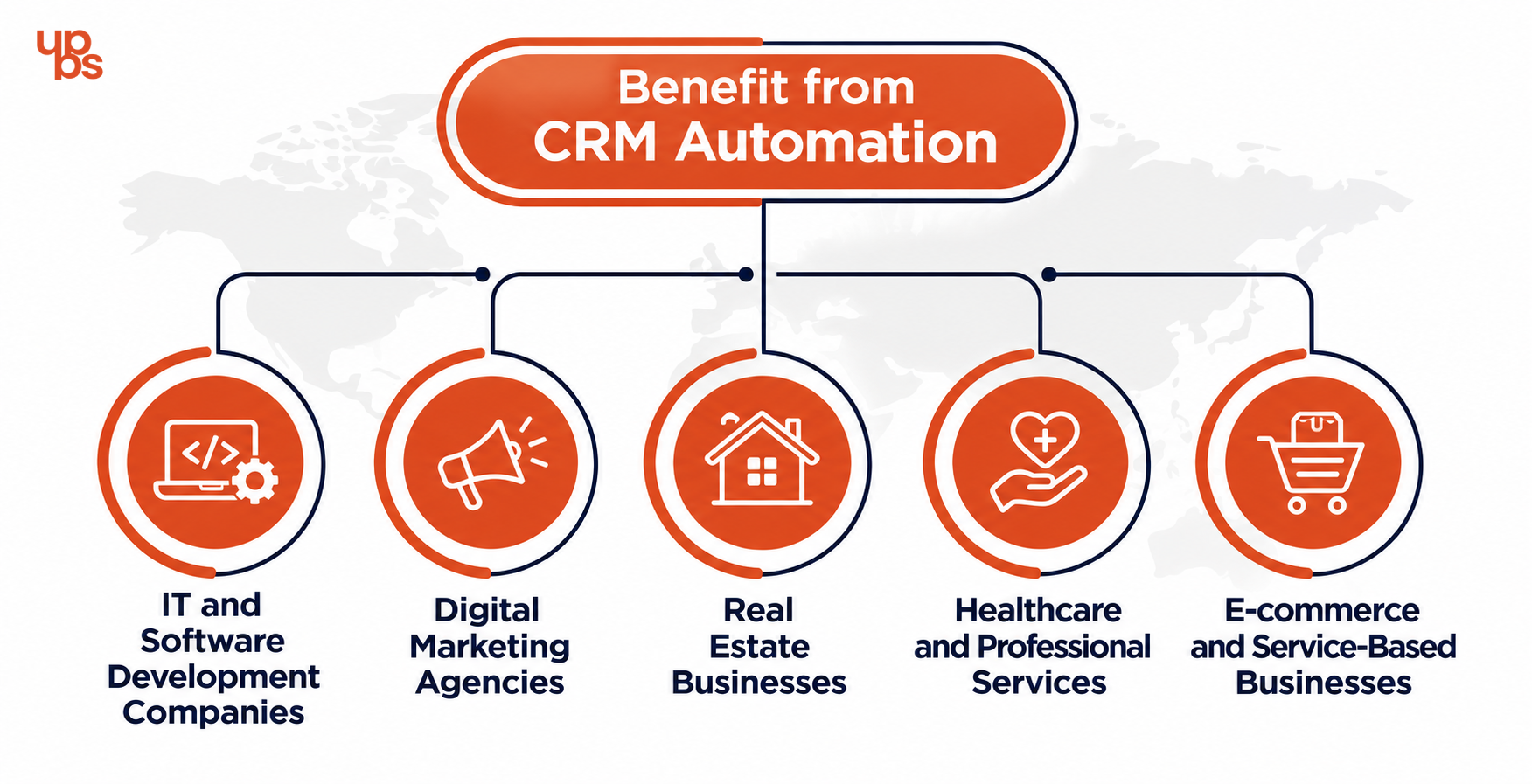
Which Businesses Can Benefit from CRM Automation?
CRM automation can benefit businesses of different sizes and industries, particularly when sales depend on inquiries, consultations, quotations, or repeated customer interactions.
IT and Software Development Companies
Software companies often receive inquiries about custom software, mobile applications, website development, and technology consulting. CRM automation can categorize leads by service, route inquiries to relevant specialists, schedule consultations, and manage proposal follow-ups.
Digital Marketing Agencies
Digital marketing agencies may receive leads for SEO, paid advertising, social media marketing, website optimization, and other services. A CRM can organize these inquiries by service requirement, help teams prioritize opportunities, and trigger follow-ups based on consultation requests or proposal status.
Real Estate Businesses
Real estate teams often handle inquiries about multiple properties, locations, budgets, and viewing schedules. CRM workflows can help assign inquiries, schedule callbacks, send relevant property information, and track prospects throughout the buying journey.
Healthcare and Professional Services
Clinics, consultants, and professional service providers can use CRM automation to manage appropriate inquiry acknowledgments, appointment requests, and permitted follow-up communication.
These businesses must also consider confidentiality, access controls, and applicable data protection requirements when handling personal information.
E-commerce and Service-Based Businesses
Businesses selling products or services can use CRM workflows to manage sales inquiries, customer questions, quotation requests, and post-purchase communication where appropriate.
The right setup depends on the business model, lead volume, customer journey, and tools already in use.
How to Implement CRM Automation in Your Business
You do not need to automate every sales activity on day one. A phased approach makes implementation easier and helps your team understand what is working.
Step 1: Audit Your Existing Sales Process
Document how leads enter your business, who handles them, how follow-ups are scheduled, and where opportunities are commonly missed. Review recent lost leads to identify recurring problems, such as delayed responses or unanswered quotations.
Step 2: Identify the Most Important Automation Opportunities
Start with the activities that create the biggest bottlenecks. For many businesses, these include lead capture, lead assignment, follow-up reminders, and sales pipeline updates. Prioritize a small number of workflows before introducing more complex sequences.
Step 3: Choose a CRM That Fits Your Requirements
Compare CRM platforms based on your sales process, budget, reporting needs, integrations, customization options, and expected growth. Consider whether you need email integration, website forms, WhatsApp integration through supported providers, lead scoring, sales dashboards, or custom workflows.
Step 4: Configure and Test Your Workflows
Define the trigger, conditions, actions, and stopping rules for each workflow. For example, when a new lead submits a website inquiry, the CRM may create a record, assign an owner, send an acknowledgment, and schedule a follow-up task.
Test different scenarios, including duplicate inquiries, missing contact information, replies to automated emails, and leads that opt out of communication.
Step 5: Train Your Sales Team
Automation works best when employees understand how leads are assigned, how activities are recorded, and when personal intervention is required.
Train the team to update lead statuses, record important conversations, review reminders, and escalate complex customer requirements.
Step 6: Monitor Performance and Optimize
Review your CRM reports regularly and compare performance against your baseline.
Identify workflows that save time, improve response consistency, or support better conversion rates. Update rules when customer behavior, sales processes, or business requirements change.
Common CRM Automation Mistakes to Avoid
Although CRM automation can improve sales operations, poor implementation can create new problems.
Automating a broken process: If your existing sales process is unclear, automation may simply make the confusion happen faster. Define ownership and sales stages before building workflows.
Sending too many follow-up messages: Excessive communication can frustrate prospects and damage your brand reputation. Use sensible intervals, relevant content, and clear stopping rules.
Ignoring data quality: Incorrect email addresses, duplicate records, and outdated lead statuses can trigger the wrong actions. Regularly review and clean your CRM data.
Using the same workflow for every lead: A prospect requesting a quotation has different needs from someone exploring your services. Adapt communication to the lead's source, interests, and buying stage.
Failing to train employees: A CRM cannot deliver its full value if the sales team avoids using it or does not understand the workflow.
Ignoring privacy and consent requirements: Configure communication preferences, access permissions, data retention, and opt-out handling appropriately. Follow applicable Indian data protection and communication requirements, including relevant consent and messaging rules.
Measuring activity instead of outcomes: More automated emails do not automatically mean more customers. Focus on meaningful metrics such as response time, meetings booked, conversion rates, and revenue.
Why Your Business May Need Customized CRM Automation
Off-the-shelf CRM platforms can provide useful features, but every business has its own sales process, customer journey, and operational requirements. A growing company may need custom lead assignment rules, integrations with an existing website, service-specific pipelines, automated quotation reminders, or dashboards designed around its sales goals. A customized CRM solution can help connect these processes into a more consistent system.
For example, a digital marketing agency may need to route SEO inquiries to one team and paid advertising inquiries to another, while tracking consultations, proposals, and deal outcomes in a centralized dashboard.An IT company may require a more complex workflow that connects website inquiries, project requirements, sales consultations, proposals, and customer onboarding.
How UPBS Technology Can Help Your Business Automate Lead Follow-Ups
At UPBS Technology, we understand that generating inquiries is only one part of business growth. Converting those inquiries into customers also requires a structured sales process, reliable communication, and clear visibility into every opportunity.
We can help you explore opportunities to:
- Organize incoming leads and reduce manual data entry.
- Improve lead routing and follow-up task management.
- Connect website inquiries with your sales workflow.
- Reduce repetitive administrative work through automation.
- Improve visibility into your sales pipeline and lead performance.
- Build or integrate solutions that support your business as it grows.
Ready to improve the way your business manages leads? Visit UPBS Technology to explore our technology and digital solutions, or contact our team to discuss your business requirements.
Conclusion
Losing leads because of missed calls, delayed responses, or forgotten follow-ups can limit business growth even when your marketing campaigns are generating inquiries. CRM automation helps address these problems by centralizing lead information, assigning responsibility, scheduling follow-ups, personalizing communication, and tracking sales performance.
Stop letting promising leads slip through the cracks. Build a smarter, more consistent sales process with CRM automation.