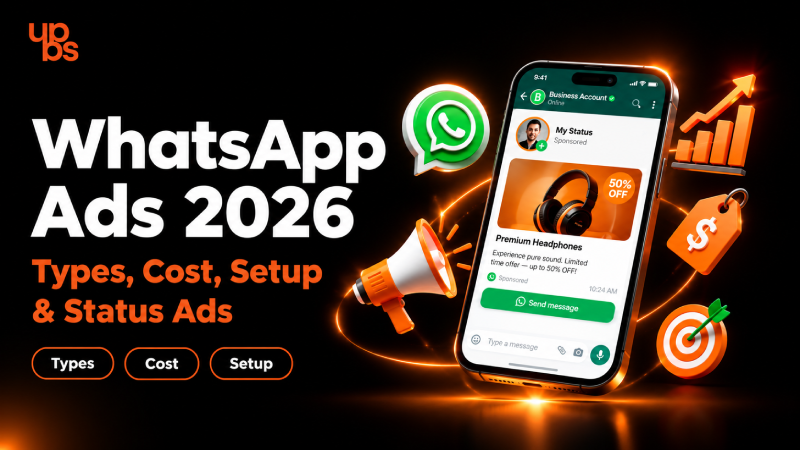
Your customers already spend hours on WhatsApp every day. Until recently, businesses could only reach them through chats or by sending people there from other platforms. In 2026, that has changed. WhatsApp ads now put your brand directly inside the app, and the choices can feel confusing: which ad type works, what does it cost, and how do you start?
This guide answers all of it. You will learn what WhatsApp ads are, the main types, how Status ads work, what pricing depends on, how to set up a campaign, and which mistakes to avoid.
What Are WhatsApp Ads?
WhatsApp ads are paid promotions that help businesses reach people on WhatsApp or start conversations with them there. They fit neatly into the wider shift described in the latest social media trends, where platforms are becoming places to discover, chat and buy in one flow.
There are two broad ways WhatsApp ads work today. The first is ads that run on Facebook or Instagram and open a WhatsApp chat when someone taps them. The second is ads placed inside WhatsApp itself, in the Updates tab, which houses Status and Channels. WhatsApp has stated that these new placements stay inside the Updates tab. Personal chats, calls and groups are not part of the ad experience.
Compared with traditional Facebook or Instagram ads, the biggest difference is the next step. Instead of sending a user to a website form, WhatsApp ads can begin a real conversation, which often feels faster and more personal to the customer.
How WhatsApp Ads Work
- You create the ad. In Meta Ads Manager, you pick an objective and choose WhatsApp as the destination or placement.
- The auction decides who sees it. Meta shows your ad to people based on your audience settings, budget and ad quality.
- The user takes action. With Click-to-WhatsApp, a tap opens a chat with your business. With Status ads, people see the ad in the Updates tab between Status updates and tap to chat or visit your site.
- Your team replies. You answer questions, share details and move the lead toward a sale.
- You measure results. Ads Manager shows cost per conversation and other metrics so you can improve.
Types of WhatsApp Ads: Click-to-WhatsApp, Status Ads & Channel Ads
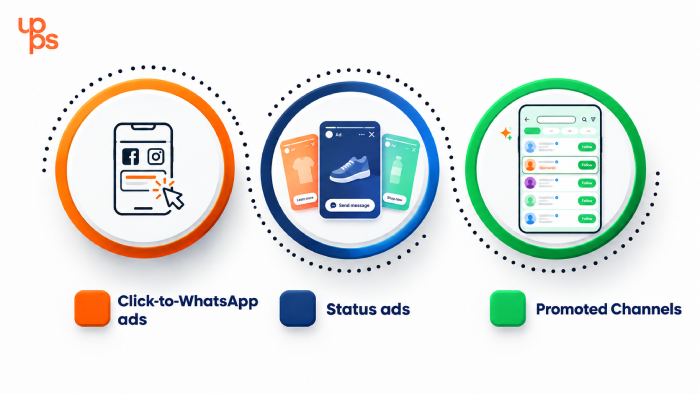
There are three main formats, and each one serves a different goal. Understanding the types of social media marketing available helps you see where each WhatsApp format fits in your wider plan.
- Click-to-WhatsApp ads. These appear on Facebook and Instagram. When a user taps the call-to-action button, a WhatsApp chat with your business opens. They are ideal for lead generation, enquiries and quick sales conversations.
- Status ads. These show up between the Status updates people watch in the Updates tab. They work like short story-style ads and help with visibility and traffic.
- Promoted Channels. These boost your WhatsApp Channel inside the Channels directory, so more people can discover and follow it. The goal here is audience building rather than direct sales.
| Format | Where it appears | Best for |
| Click-to-WhatsApp | Facebook and Instagram | Leads and direct chats |
| Status ads | WhatsApp Updates tab | Awareness and traffic |
| Promoted Channels | Channels directory | Followers and community |
WhatsApp Status Ads Explained: Format, Placement & Who It's For
Status ads are the newest addition, and they are where most of the 2026 excitement sits. If you want these placements to deliver measurable results, a focused performance marketing approach helps you track what each ad is actually earning.
Placement. Status ads appear in the Updates tab alongside the Status updates users already view. WhatsApp has said the Updates tab is used by roughly 1.5 billion people daily, which gives these ads a large potential audience.
Format. They are visual, so expect short images or videos with a clear call-to-action. Keep the message simple and the visual strong, because users scroll quickly.
Privacy and targeting. WhatsApp has said personal messages and calls remain end-to-end encrypted and are not used for ad targeting. Delivery relies on limited signals such as general location, language, followed Channels and past ad interactions. In some regions, users may be offered an ad-free subscription for Status and Channels.
Who it's for. Retail brands, restaurants, salons, education providers, real estate firms and service businesses all benefit, especially if their customers already use WhatsApp for enquiries.
Which WhatsApp Ad Type Should You Choose for Your Business?
The right format depends on your goal and your business model. If you are launching a mobile app and want users to ask questions before installing, Click-to-WhatsApp ads give you that direct support channel.
Use this quick guide:
- Need leads and enquiries? Choose Click-to-WhatsApp ads.
- Want brand visibility and traffic? Choose Status ads.
- Building a community or broadcast audience? Choose Promoted Channels.
By business type, local shops and service providers usually get the fastest results from Click-to-WhatsApp. E-commerce brands can combine Status ads for product visibility with Click-to-WhatsApp for order support. B2B companies often prefer Click-to-WhatsApp because it lets sales teams qualify prospects in a conversation. Most businesses eventually use two formats together.
Benefits of WhatsApp Ads for Businesses
WhatsApp ads give businesses a rare mix of reach and conversation. Here is what they offer.
- Direct conversations. Customers can ask questions instantly instead of filling out a form and waiting.
- Higher intent. A person who taps to start a chat is usually more serious than someone who only clicks a link.
- Faster follow-up. Your team can respond in real time, share catalogs, send pricing and close deals in one thread.
- Familiar environment. Users already trust and use WhatsApp daily, so there is less friction.
- Flexible goals. You can aim for leads, sales support, awareness or follower growth depending on the format.
Used well, WhatsApp ads shorten the gap between interest and purchase.
How Much Do WhatsApp Ads Cost in 2026?
There is no single fixed price. WhatsApp ads run on an auction model through Meta's advertising system, which means your cost changes with competition and quality. If you prefer to hand the budget and optimization to specialists, white-label social media management is one route many agencies and brands explore.
Several factors shape what you pay:
- Audience. Narrow or highly competitive audiences usually cost more.
- Location. Costs vary widely between countries and cities.
- Industry. Sectors like real estate, finance and education tend to be more expensive.
- Creative quality. Strong, relevant ads often earn better delivery at lower cost.
- Objective and format. Click-to-WhatsApp and Status ads can be priced differently.
The most reliable way to estimate your budget is to open Meta Ads Manager, select your objective and check the estimated results shown there. Start with a small test budget, measure cost per lead, then scale what works. Because Status ads and Promoted Channels are still rolling out in phases, always confirm current availability and pricing in your account before committing a large budget.
How to Set Up WhatsApp Ads
Setting up is simple once your accounts are connected. Whether you plan to manage campaigns from a laptop or your phone, it helps to know the Android vs iOS differences in how apps behave, because many marketers monitor results on mobile.
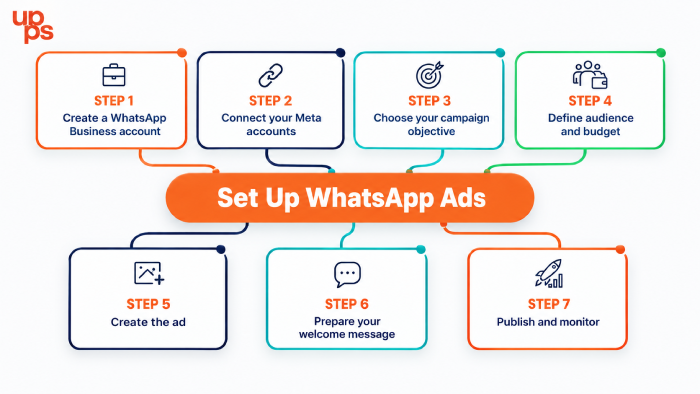
Step 1: Create a WhatsApp Business account. Use the WhatsApp Business app or API, and complete your business profile with name, description and contact details.
Step 2: Connect your Meta accounts. Link your WhatsApp number with your Facebook Page and Meta Business account so ads can send people to your chat.
Step 3: Choose your campaign objective. In Ads Manager, pick an objective such as leads or messages, and select WhatsApp as the conversation destination.
Step 4: Define audience and budget. Set location, age, interests and a daily or lifetime budget. Start small while you test.
Step 5: Create the ad. Add a clear image or short video, a direct headline, and a call-to-action like "Send message" or "Chat on WhatsApp".
Step 6: Prepare your welcome message. Write a quick greeting and a few suggested replies so new chats feel organized from the first second.
Step 7: Publish and monitor. Check cost per conversation, reply rate and lead quality, then refine.
If you use a WhatsApp Business Solution Provider such as AiSensy, you can often manage templates, replies and campaign tracking from one dashboard, including on its mobile app for Android and iOS. Check each provider's current features and charges before you decide.
WhatsApp Ads Best Practices to Boost Conversions in 2026
Good setup gets you started, but good habits drive results. Remember that ad traffic needs a strong destination, and understanding how Google ranks websites helps you keep your landing pages healthy for both paid and organic visitors.
- Lead with one clear offer. Do not crowd the creative with several messages.
- Use short video or bold visuals. Status placements reward quick, eye-catching content.
- Write a specific call-to-action. "Get a free quote on WhatsApp" works better than "Learn more".
- Reply fast. Aim to respond within minutes. Slow replies waste the ad spend you already paid.
- Set up quick replies and labels. They keep conversations organized as volume grows.
- Test creatives. Run two or three versions and keep the winner.
- Track beyond clicks. Measure conversations started, qualified leads and final sales.
Common WhatsApp Ads Mistakes to Avoid
Many campaigns fail for simple reasons rather than complicated ones.
- Weak call-to-action. If users do not know what happens after tapping, they will not tap.
- Slow response time. A lead who waits hours often goes to a competitor.
- No follow-up system. Without tagging, reminders or a CRM, promising chats get lost.
- Targeting too broadly. Wide audiences waste the budget on people who will never buy.
- Ignoring consent. Always follow WhatsApp's business policies and respect opt-ins.
- Judging by clicks only. A cheap click means little if it never becomes a customer.
Fixing these basics often improves results more than increasing the budget.
Why Choose UPBS Technology for WhatsApp Ads
Running WhatsApp ads well takes more than clicking publish. You need the right format, sharp creatives, a clean conversation flow and a system that turns chats into customers. That is where an experienced team makes the difference. For campaigns that cover strategy, creatives and optimization together, explore our social media marketing services.
At UPBS Technology, we help businesses plan WhatsApp campaigns from the first idea to ongoing optimization. That includes choosing the right ad format, designing creatives, setting up landing pages and connecting leads to a follow-up process, so every enquiry gets a fast and organized reply.
If you want WhatsApp ads that generate real conversations instead of empty clicks, book a free consultation with our team today and get a plan built around your business goals.
Conclusion
WhatsApp ads are no longer a future idea. Click-to-WhatsApp ads, Status ads and Promoted Channels give businesses three different ways to reach customers where they already spend their time. Choose the format that matches your goal, test with a small budget, reply quickly and track real outcomes rather than clicks.
Start simple, learn from the data and scale what works. The businesses that move early on WhatsApp ads in 2026 will build an advantage that is hard for late starters to catch.
Frequently Asked Questions
Are WhatsApp ads available in India?
Yes. Meta has said ads in Status and Promoted Channels are rolling out in India, and Click-to-WhatsApp ads are already available through Facebook and Instagram. Availability can vary by account, so check Ads Manager.
How much do WhatsApp ads cost?
Cost depends on the auction, your audience, location, industry and ad quality. Use Meta Ads Manager's estimates and start with a small test budget.
What are WhatsApp Status ads?
They are ads shown in the Updates tab between Status updates. They help businesses gain visibility and drive people to chat or visit a website.
Do WhatsApp ads use my private chats for targeting?
No. WhatsApp has stated that personal messages and calls stay end-to-end encrypted and are not used for ad targeting.
Can small businesses run WhatsApp ads?
Yes. A small test budget is enough to begin, especially with Click-to-WhatsApp ads, and you can scale once you see results.