
Improving your website's SEO (Boost your ranking) is no longer optional. Whether you're a small business owner, marketer, developer, or content creator, an SEO-friendly website is what keeps you visible as search keeps changing. In simple terms, it's a site that Google and Bing can easily find, understand, and rank, while giving visitors a smooth experience.
The good news? You don't need to be an expert to see results. In 2026, a few practical fixes, from page speed to AI search visibility, can bring more traffic and better leads.
Here are 10 simple but effective pro tips to take your website's SEO to the next level, including a bonus tip on AI Overviews.
Key Factors of an SEO-Friendly Website
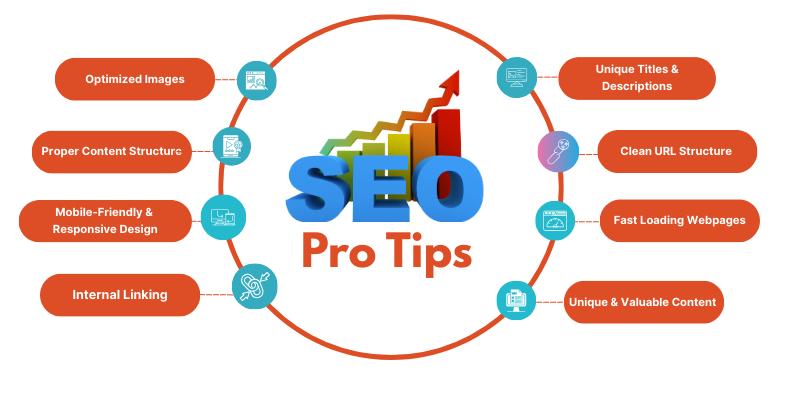
Unique Titles & Descriptions: The First Impression Matters
Your title tag and meta description are the first things users see in Google search results. A unique, keyword-focused title attracts more clicks, while a clear meta description encourages users to visit your website. Avoid duplicate or generic titles and descriptions, as they can reduce your search visibility and click-through rate. Every important page should have its own optimized title and description that accurately reflects the content.
Why It Matter
Unique titles and meta descriptions help search engines understand your page and encourage more users to click on your website. They improve your click-through rate (CTR), support better SEO performance, and make your pages stand out in search results.
Pro Tips
- Include primary keywords naturally.
- Keep titles under 60 characters and descriptions under 155 characters.
- Write compelling descriptions that entice users to click without making false promises.
Example of a good title & description:
- Title: The Ultimate Guide to Baking Perfect Brownies
- Description: Want fudgy, gooey brownies every time? Discover expert tips, recipes, and tricks to bake mouthwatering brownies in your own kitchen.
Clean URL Structure: Easy for Users & Search Engines
A clean, simple URL makes it easier for both users and search engines to understand your page. Use short, descriptive URLs that include relevant keywords, and avoid unnecessary numbers, symbols, or random characters. A well-structured URL improves readability, SEO, and user trust.
Why It Matters
Clean URLs help search engines crawl your website more effectively, improve rankings, and provide a better user experience. They also make links easier to share and remember.
Pro Tips
-
- Use “speaking URLs” (e.g., example.com/boost-seo-tips instead of example.com/p=123).
- Avoid redundant stop words like a, an, the.
- Structure URLs to reflect the page hierarchy.
Improve Page Speed & Core Web Vitals
Website speed is an important SEO factor (Compare SEO firms) that directly affects user experience and search rankings. Fast-loading pages keep visitors engaged, reduce bounce rates, and help improve conversions. Optimize images, enable caching, and minimize unnecessary code. Also keep an eye on Core Web Vitals, especially Interaction to Next Paint (INP), which measures how quickly your page responds when someone taps or clicks.
- Why It Matters - A faster website improves user satisfaction, supports better SEO performance, and increases the chances of ranking higher in search results while encouraging visitors to stay longer on your site.
Pro Tips
-
- Compress images without losing quality using tools like TinyPNG.
- Enable browser caching to improve load times for repeat visitors.
- Use a Content Delivery Network (CDN) to reduce server response times.
Publish Original Content That Matches Search Intent
Content is the foundation of a successful website. Publish original, informative content that answers exactly what your audience is searching for, and match the format to the intent, whether they want a quick answer, a how-to guide, or a comparison. Keep it updated, easy to read, and focused on solving real problems.
Why It Matters
-
- Focus on solving user problems—write for humans, not robots.
- Update old blog posts with fresh information to maintain relevance.
- Use visual elements like videos, infographics, and images to add value.
Show Real Experience with E-E-A-T
Google looks for signals that real people with real expertise are behind your content. That's what E-E-A-T (Experience, Expertise, Authoritativeness, Trustworthiness) is about, and it matters even more now that AI tools can produce generic content at scale.
The easiest way to show it is through proof of work. Sharing a detailed case study (See real results) tells readers and search engines that your advice comes from actual projects, not guesswork.
- Add an author bio with real credentials and years of experience
- Back claims with data, examples, or screenshots from your own work
- Cite trustworthy sources and keep facts updated
- Show clear contact details, an About page, and client results
Optimized Images: Make Your Site Look Great Without Slowing It Down
Images enhance your website's appearance and improve user engagement, but large, unoptimized files can slow down your site. Compress images, use modern formats like WebP, add descriptive file names, and include relevant alt text to improve accessibility and SEO. Choose the right image size for each page to maintain fast loading speeds.
Why It Matters
Optimized images improve page speed, enhance user experience, support better search engine rankings, and help search engines understand your visual content. They also reduce bandwidth usage while keeping your website visually appealing.
Pro Tips
-
- Use descriptive, keyword-focused filenames (e.g., green-tea-latte-recipe.jpg instead of DSC0003.jpg).
- Add alt text for accessibility and improved search visibility.
- Choose next-gen formats like WebP over traditional PNG or JPG.
Proper Content Structure: Easy to Read, Easy to Rank
Well-structured content makes it easier for both users and search engines to understand your page. Use clear headings, short paragraphs, bullet points, and relevant keywords to organize your content. A logical structure improves readability and helps visitors quickly find the information they need.
Why It Matters
-
- Use H1 for the main title, H2 for major sections, and H3 for subsections.
- Break up content with paragraphs, bullet points, or numbered lists.
- Use whitespace to improve visual appeal.
Mobile-Friendly & Responsive Design: Google Loves Mobile-First
Most users browse websites on their smartphones, so your website must work smoothly on every screen size. A mobile-friendly, responsive design ensures your content, images, and navigation automatically adjust to desktops, tablets, and mobile devices, providing a consistent user experience.
Why It Matters
-
- Use Google’s Mobile-Friendly Test to check your site.
- Avoid pop-ups or intrusive ads on mobile.
- Ensure all buttons and menus are easy to tap.
Internal Linking: Connect Your Content for Better Rankings
Internal links connect related pages on your website, making it easier for users to navigate and discover more valuable content. They also help search engines understand your website structure and the relationship between different pages. Use relevant, natural anchor text when linking to important pages.
Why It Matters
A strong internal linking strategy improves website navigation, distributes page authority across your site, helps search engines crawl your content more efficiently, and increases the chances of higher search rankings.
Pro Tips
-
- Link your key pages naturally within your content.
- Use descriptive anchor texts instead of generic ones like “click here.”
- Avoid overloading a single page with too many links.
User Experience (UX): Keep Visitors Engaged
A great user experience (UX) makes your website easy to navigate, visually appealing, and simple to use. Clear navigation, readable content, fast-loading pages, and well-placed call-to-action buttons help visitors find what they need quickly and encourage them to stay longer.
Why It Matters
A positive user experience increases visitor engagement, reduces bounce rates, improves conversions, and sends positive signals to search engines, helping your website perform better in search results.
Pro Tips
-
- Use clear menus and navigation paths.
- Improve readability with clean fonts and contrast.
- Ensure forms and interactive elements function seamlessly.
Optimize for AI Overviews & Generative Engine Optimization (GEO)
Search is no longer just a list of blue links. Google's AI Overviews and AI assistants now summarize answers and cite a few sources. Optimizing for this is called Generative Engine Optimization (GEO), and the goal is simple: make your content easy for AI systems to understand, trust, and cite.
GEO doesn't replace traditional SEO. It builds on top of it, so your SEO basics (Start with basics) still need to be solid: crawlable pages, fast loading, and clear structure.
Why It Matters
More users now get answers directly on the results page. If your content is the clear, trustworthy answer, you have a better chance of being cited and still earning the click.
Pro Tips
- Start sections with a direct, concise answer, then add detail
- Use clear headings, short definitions, and simple tables or lists
- Add FAQ and Article schema markup so machines can read your page
- Build brand authority with expert authors and consistent, accurate information